
New Office IT Setup Guide: Complete IT Infrastructure Checklist for Businesses
 Kapadia Infotech
Introduction
Setting up a new office is exciting, but one of the biggest mistakes businesses make is focusing on furniture and interiors while overlooking IT infrastructure planning.
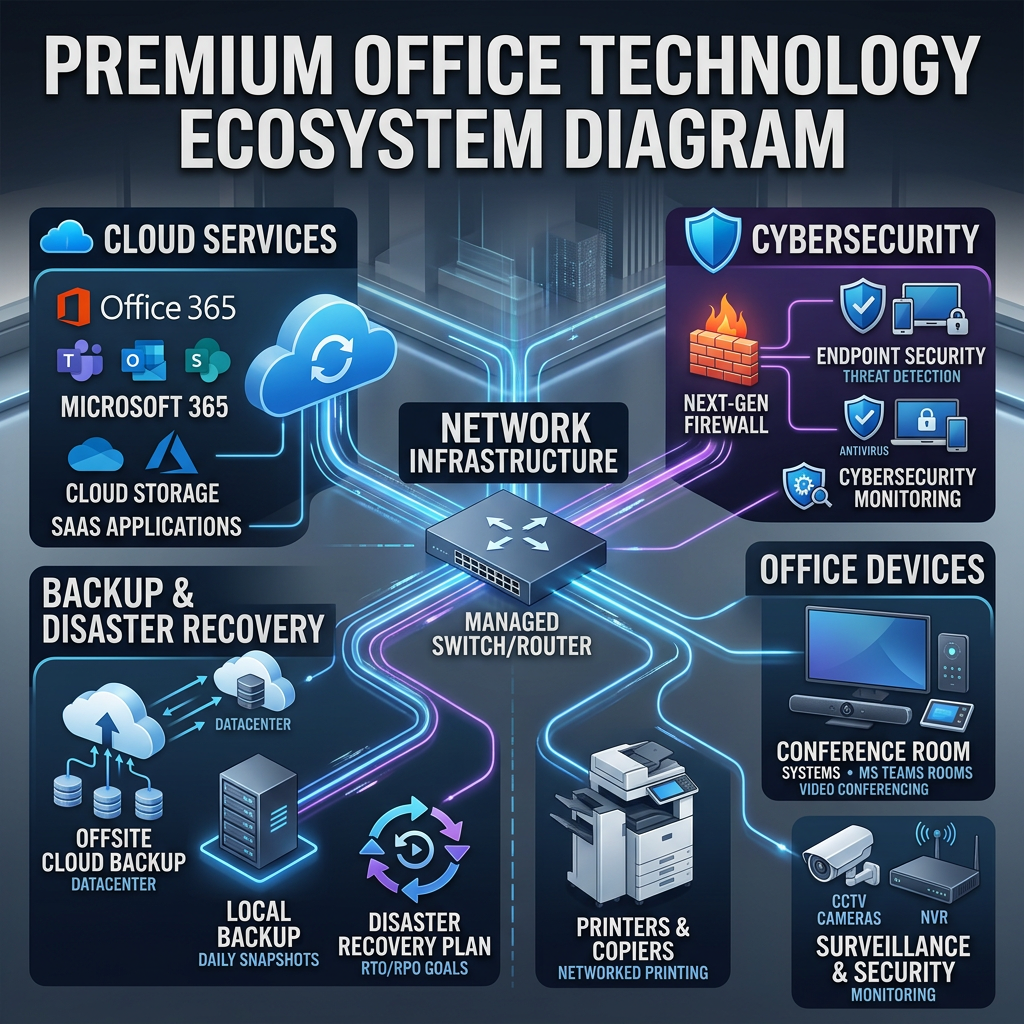
Your computers, network, internet connectivity, business email, cybersecurity, backup systems, conference rooms, printers, and access control systems will directly impact employee productivity, collaboration, security, and business continuity.
Whether you're opening a startup office, expanding to a larger workspace, or building a corporate branch, this complete office IT setup guide will help you understand exactly what technology infrastructure your business needs.
Office IT Infrastructure Goal
Build a secure, scalable, reliable technology foundation that supports growth today and remains future-ready for tomorrow.

Complete New Office IT Infrastructure Checklist
| Infrastructure Component | Importance | Priority |
|---|---|---|
| Business Internet Connection | Foundation of all communication and cloud services | Must Have |
| Network Switches & Cabling | Connect all devices reliably | Must Have |
| Business WiFi | Wireless productivity and mobility | Must Have |
| Laptops & Desktops | Primary user devices | Must Have |
| Microsoft 365 | Email, Teams, Office apps and collaboration | Must Have |
| Firewall & Security | Protect business data and network | Recommended |
| Backup & Disaster Recovery | Business continuity and ransomware protection | Recommended |
| CCTV & Access Control | Physical security and attendance | Recommended |
| Conference Room Solutions | Hybrid meetings and collaboration | Growth Stage |
The 8 Core Technology Areas Every Office Needs
Computers & Endpoints
Business laptops, desktops, workstations, docking stations, monitors and accessories based on user roles.
Business Networking
Structured cabling, switches, routers and enterprise WiFi infrastructure.
Microsoft 365
Professional email, Teams collaboration, cloud storage and productivity tools.
Cybersecurity
Firewall, antivirus, EDR, email security and endpoint protection.
Data Protection
Cloud backup, disaster recovery and ransomware recovery solutions.
Printing Solutions
Managed printers, multifunction devices and scanning solutions.
Physical Security
CCTV surveillance, biometric attendance and access control systems.
Meeting Rooms
Displays, projectors, conferencing systems and collaboration solutions.
Cybersecurity Should Be Planned From Day One
Many businesses wait until they experience a cyberattack before investing in security.
Modern businesses should implement:
- Firewall protection
- Endpoint security
- Email security
- Multi-factor authentication
- Device management policies
- Regular security monitoring
The cost of prevention is significantly lower than the cost of recovering from a ransomware attack or data breach.
Backup and Disaster Recovery: Don't Confuse the Two
| Backup | Disaster Recovery |
|---|---|
| Protects your data | Protects business operations |
| Restores files | Restores entire systems |
| Focuses on information | Focuses on business continuity |
| Hours or days recovery | Minutes recovery |
Every modern office should have both.
Common IT Setup Mistakes Businesses Make
- Buying consumer-grade networking hardware
- No cybersecurity planning
- No backup strategy
- No future scalability planning
- Choosing internet based only on price
- Ignoring WiFi coverage planning
- No documentation of infrastructure
- Using personal email instead of business email
How to Future-Proof Your Office Infrastructure
Technology requirements will grow as your business grows.
Choose scalable solutions that can support:
- More employees
- Additional locations
- Hybrid work environments
- Cloud applications
- Advanced security requirements
Planning a New Office?
Our team helps businesses design and deploy complete IT infrastructure including networking, Microsoft 365, cybersecurity, backup, conference rooms, printers, CCTV and access control solutions.
Talk to Our Infrastructure ExpertsFrequently Asked Questions
What IT infrastructure is required for a new office?
Most offices require internet connectivity, networking, WiFi, computers, Microsoft 365, cybersecurity, backup solutions, printers and collaboration tools.
Should small businesses invest in cybersecurity?
Yes. Small businesses are increasingly targeted by cybercriminals because they often have weaker security controls.
Do businesses need backup and disaster recovery?
Yes. Backup protects data while disaster recovery ensures business operations can continue during major outages or cyber incidents.
What is the most important part of office IT infrastructure?
Reliable networking, cybersecurity and data protection form the foundation of a modern business environment.
Final Thoughts
A successful office isn't built only with desks and chairs. It requires a secure, scalable and reliable IT infrastructure that supports productivity, collaboration and future growth.
Planning correctly from the beginning can reduce costs, improve efficiency and eliminate many technology problems before they happen.


