
AI PC Build in Ahmedabad: Complete Local AI Workstation Guide 2026
 Kapadia Infotech
Introduction
Artificial Intelligence is moving from cloud-only services to local AI computing.
Developers, businesses, researchers, creators and technology teams are increasingly looking for computers that can run AI models, local LLMs, generative AI, coding assistants, computer vision and AI agents directly on their own hardware.
But building a computer for AI is very different from building a normal office PC or gaming PC.
A powerful CPU alone does not make a good AI workstation. A gaming GPU with high benchmark scores is not automatically the best choice either.
For local AI, the most important questions are:
- How much GPU VRAM does the AI model require?
- How much system RAM is required?
- Does the application support NVIDIA CUDA, Intel XPU, AMD ROCm or another compute platform?
- Will the system run one model or several AI agents simultaneously?
- Are long context windows and large datasets required?
- Will the workload involve inference, fine-tuning, training, image generation or AI development?
- Should an existing workstation be upgraded or should a new AI PC be built?
This guide explains how to choose the right AI PC or AI workstation in Ahmedabad without spending money on hardware that does not match your actual workload.
Quick Answer: What Makes a Good AI PC?
If you are looking for a simple answer, an AI PC should be designed around memory capacity, GPU acceleration and software compatibility rather than gaming performance alone.
| Component | What Matters for AI | Typical High-End Target |
|---|---|---|
| GPU | VRAM, compute performance, software ecosystem | 32GB+ VRAM for serious local AI |
| System RAM | Model loading, datasets, CPU workloads, multitasking | 128GB–256GB+ |
| CPU | Data preparation, preprocessing and general workloads | High-core-count modern CPU |
| Storage | Models, datasets, checkpoints and applications | 2TB–8TB NVMe SSD |
| Power Supply | Stable delivery for high-power GPUs | High-quality, correctly sized PSU |
| Cooling | Sustained AI workloads | High-performance CPU + GPU cooling |
| OS | AI framework and driver compatibility | Linux or Windows depending on workload |
Important: There is no universal "best AI PC". The correct configuration depends on the exact AI models, framework, context length, quantization, number of users and whether the workload is inference, fine-tuning or training.
What is a Local AI PC?
A local AI PC is a computer capable of running AI workloads on hardware located at your home, office, laboratory or business instead of sending every request to a cloud AI service.
Local AI can include:
- Local Large Language Models (LLMs)
- AI coding assistants
- AI chatbots
- Retrieval-Augmented Generation (RAG)
- Private company knowledge assistants
- AI agents and agentic workflows
- AI image generation
- AI video generation
- Speech recognition and transcription
- Computer vision
- Document processing
- Fine-tuning and experimentation
- Machine learning development
The biggest advantage is that sensitive information can remain inside the organization's infrastructure when the software and deployment are configured for local processing.
Why Are Businesses Interested in Local AI?
Cloud AI is extremely useful, but businesses increasingly have reasons to consider local or hybrid AI.
1. Data Privacy
Companies may not want confidential documents, source code, customer information, engineering files or internal knowledge sent to external AI services.
2. Predictable Infrastructure
For workloads that run continuously, owning the hardware can provide predictable infrastructure costs instead of paying for every API request or cloud GPU hour.
3. Lower Latency
When the model is already running locally, applications do not need to send every request to a remote cloud server.
4. Offline or Restricted Environments
Some organizations require AI processing inside a controlled network or in environments where internet access is limited.
5. AI Agents and Automation
Modern AI is increasingly moving from simple chatbots toward AI agents that can use tools, process documents, write code, interact with applications and perform multi-step tasks.
These workflows can create substantially higher memory and compute requirements than a simple chatbot.
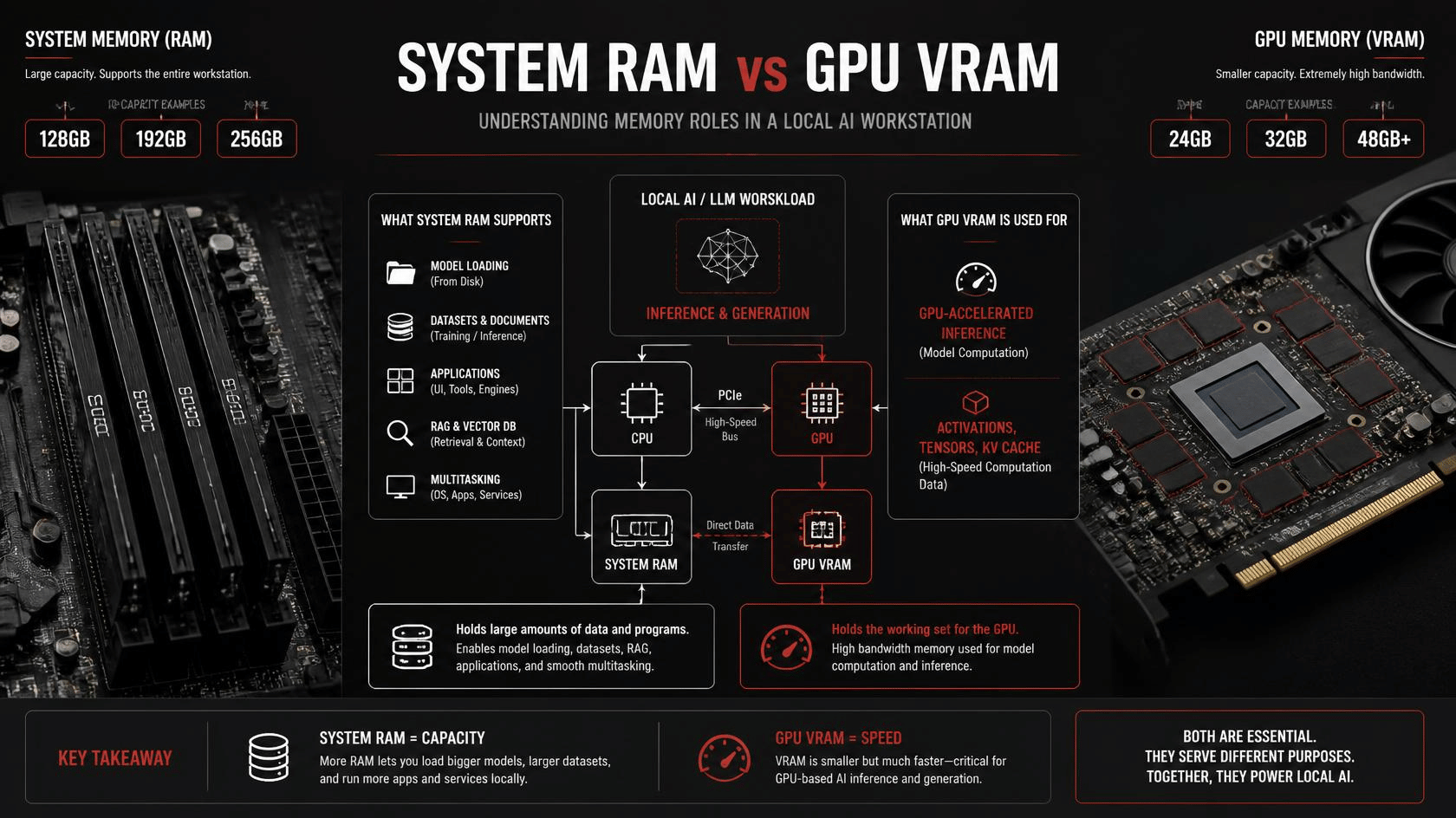
RAM vs VRAM: The Most Important AI PC Concept
One of the biggest mistakes when buying an AI PC is treating system RAM and GPU VRAM as the same thing.
They are not.
| Memory | Primary Purpose | AI Importance |
|---|---|---|
| System RAM | CPU workloads, datasets, model loading, applications | Very High |
| GPU VRAM | GPU model weights, activations, KV cache and GPU workloads | Critical for GPU inference |
| Unified Memory | Shared CPU/GPU memory in systems designed around unified architecture | Important for systems such as DGX Spark |
| SSD Storage | Models, datasets, checkpoints and applications | Important but not a substitute for RAM/VRAM |
Why VRAM Matters
If a local AI model needs more GPU memory than your graphics card has available, the system may need to offload part of the workload to system RAM or may fail completely depending on the software.
For this reason, a GPU with more VRAM can sometimes be more useful for AI than a faster GPU with less VRAM.
Why System RAM Matters
System RAM becomes increasingly important when working with:
- Large local models
- CPU inference
- Large datasets
- Long-context AI applications
- RAG databases
- Multiple AI applications
- Multiple AI agents
- Development environments and containers
- Virtual machines
This is why some new AI applications can recommend 128GB, 192GB, 256GB or even more system memory.
Does 192GB RAM Mean You Need a New PC?
Not necessarily.
If your existing computer has a suitable motherboard, CPU, memory slots and BIOS support, upgrading the RAM may be the most economical solution.
For example, a workstation with a high-end CPU and a powerful NVIDIA GPU may still have many years of useful life if the only limitation is system memory.
Before replacing the entire PC, check:
- Maximum supported RAM
- Number of DIMM slots
- Supported memory capacity per DIMM
- Memory compatibility
- Stable memory speed with all modules installed
- CPU memory controller limitations
- BIOS version
- Current GPU VRAM usage
For AI workloads, stable 192GB RAM is generally more useful than unstable high-frequency RAM.
How Much RAM Does an AI PC Need?
| System RAM | Suitable Starting Point | Typical Use |
|---|---|---|
| 32GB | Entry local AI | Smaller models, development and AI applications |
| 64GB | Strong mainstream | Local LLMs, coding, image generation and multitasking |
| 128GB | High-end | Larger models, RAG, development and professional workloads |
| 192GB | Very high-end | Large-model workflows and demanding agentic workloads |
| 256GB+ | Professional workstation | Large datasets, advanced AI development and multi-workload systems |
These are planning tiers rather than universal requirements. The actual requirement depends on the model, quantization, context size and software architecture.
How Much VRAM Do You Need for Local AI?
GPU memory is often the first specification to examine when choosing a local AI graphics card.
| GPU VRAM | General AI Position |
|---|---|
| 8GB | Entry-level AI and smaller models |
| 12GB–16GB | Good mainstream local AI starting point |
| 24GB | Serious local AI and larger models |
| 32GB | High-end local AI and larger context workloads |
| 48GB+ | Professional AI workstation workloads |
| 96GB | Large-model professional workloads |
Remember that model size alone does not determine memory requirements.
Quantization, context length, KV cache, batch size, concurrent users and the AI framework can significantly change the amount of memory required.
Why a 24GB GPU Can Still Struggle with a New AI Model
Consider a workstation with:
- High-end 24-core CPU
- 128GB system RAM
- 24GB NVIDIA GPU VRAM
It may appear extremely powerful—and it is.
However, if a new AI application needs more than 24GB of GPU memory for its preferred configuration, the GPU can become the bottleneck even when the computer has 128GB or 192GB of system RAM.
This is why an AI workstation assessment should always check both RAM and VRAM utilization.
CPU Selection for an AI Workstation
The GPU usually receives most of the attention, but the CPU remains important.
A high-end AI PC may use the CPU for:
- Data preprocessing
- Document processing
- Data loading
- CPU inference
- RAG pipelines
- Database operations
- AI application orchestration
- Compiling software
- Running containers and virtual machines
- General professional workloads
For a GPU-heavy local AI system, however, spending the entire budget on an extremely expensive CPU while using a low-VRAM GPU is usually the wrong allocation.
AI workstation design should balance CPU, GPU, RAM, storage, PCIe lanes, power and cooling.
Choosing the Right GPU for Local AI
GPU selection is one of the most important decisions in an AI PC build.
NVIDIA GeForce RTX GPUs
NVIDIA GeForce RTX GPUs are popular for local AI because of their CUDA ecosystem, mature AI software support and strong GPU compute capabilities.
The RTX 5090, for example, provides 32GB of GDDR7 memory and Blackwell architecture, making it an important option for high-end consumer AI workstations.
NVIDIA RTX PRO Workstation GPUs
For professional AI workstations, NVIDIA's RTX PRO range provides higher-memory options designed for professional workloads.
Depending on the model, current RTX PRO Blackwell workstation GPUs provide configurations ranging from 24GB to 96GB of ECC GPU memory.
These products become particularly interesting when the workload requires large models, professional stability, large datasets or long-running AI applications.
Intel Arc Pro B-Series
The Intel Arc Pro B70 is an interesting alternative for local AI because it provides 32GB of GDDR6 memory and high memory bandwidth.
However, GPU selection should never be based only on VRAM capacity.
Before choosing an Intel Arc Pro GPU, verify that the exact AI framework, application and model support the required Intel software stack and acceleration path.
Why More VRAM Does Not Automatically Mean Better AI Performance
A 32GB GPU is not automatically faster than a 24GB GPU.
VRAM determines whether a workload can fit comfortably, while compute performance and memory bandwidth influence how quickly the workload can run.
The correct question is therefore:
"Which GPU provides enough memory and the right software support for this AI workload?"
What About NVIDIA DGX Spark?
NVIDIA DGX Spark is a different category from a traditional custom-built desktop workstation.
It uses NVIDIA's GB10 Grace Blackwell platform and provides 128GB of coherent unified memory in a compact desktop system.
NVIDIA positions DGX Spark for AI development, inference, fine-tuning and agentic AI workloads, including local testing of very large models.
| Feature | Custom AI PC | DGX Spark |
|---|---|---|
| Memory Architecture | Separate system RAM + GPU VRAM | Unified memory |
| Hardware Customization | Very High | Limited |
| GPU Selection | Choose based on workload | Integrated GB10 platform |
| Upgradeability | High | Limited |
| Form Factor | Desktop / workstation | Very compact |
| AI Software Ecosystem | Depends on configuration | NVIDIA AI stack |
| Best For | Flexible custom workloads | Compact AI development and inference |
DGX Spark is particularly attractive when a customer wants a compact NVIDIA AI development platform rather than a highly configurable workstation.
However, if an application specifically requires 192GB of conventional system RAM, a 128GB DGX Spark should not automatically be considered a replacement for a 192GB workstation.
DGX Spark vs Custom AI PC: Which Should You Buy?
Choose DGX Spark When:
- You want a compact AI development system.
- You prefer NVIDIA's integrated AI software environment.
- You want unified memory for supported large-model workloads.
- You are developing and testing AI agents.
- You want a specialized AI machine rather than a general-purpose PC.
- You value a small and power-efficient form factor.
Choose a Custom AI PC When:
- You need 192GB, 256GB or more system RAM.
- You want a specific GPU.
- You need 32GB, 48GB, 72GB or 96GB+ GPU memory.
- You need upgradeable components.
- You want multiple GPUs.
- You need large NVMe storage.
- You want a workstation customized around a specific AI application.
- You want the flexibility to upgrade the GPU later.
Should You Upgrade Your Existing PC or Build a New AI PC?
This is one of the most common questions customers ask.
The answer depends on the bottleneck.
| Current Limitation | Recommended Action |
|---|---|
| System RAM is full | Upgrade RAM |
| GPU VRAM is full | Consider a higher-VRAM GPU |
| GPU compute is insufficient | Upgrade GPU |
| CPU is constantly saturated | Consider CPU/platform upgrade |
| Motherboard cannot support required RAM/GPU | Build a new workstation |
| Power supply is insufficient | Upgrade PSU before higher-power GPU |
| Cooling is inadequate | Upgrade cooling/chassis airflow |
| AI software has poor hardware support | Choose hardware supported by the software |
This approach can save a customer a significant amount of money.
Example: Upgrading a High-End Existing Workstation
Imagine an existing workstation with:
- High-end Intel Core Ultra processor
- 128GB DDR5 RAM
- NVIDIA RTX 4090 24GB
- Fast NVMe SSD
- High-end motherboard
If the AI application is primarily running out of system RAM, replacing the entire computer may be unnecessary.
A properly validated RAM upgrade to 192GB or 256GB may be the better solution.
However, if the AI workload is hitting the GPU's 24GB VRAM limit, increasing system RAM alone may not solve the problem.
This is why professional AI PC planning should start with workload analysis rather than component shopping.
AI PC for Local LLMs
Local Large Language Models can have very different hardware requirements.
A smaller quantized model may run comfortably on a mainstream GPU, while larger models with long context windows can require substantially more memory.
For local LLM workloads, consider:
- Model parameter count
- Quantization format
- GPU VRAM
- System RAM
- Context length
- KV cache requirements
- Number of simultaneous users
- Inference engine
- CPU/GPU offloading
- Expected tokens-per-second performance
AI PC for AI Agents and Agentic AI
Agentic AI introduces another important consideration.
A simple chatbot may execute one inference request at a time.
An AI agent may instead:
- Read documents
- Search a knowledge base
- Call tools
- Execute code
- Use APIs
- Maintain long context
- Run multiple sub-agents
- Generate intermediate results
- Interact with local applications
As agent workflows become more complex, memory capacity and system stability become increasingly important.
This is one reason businesses planning long-term local AI infrastructure should avoid buying a system that only satisfies today's minimum requirement.
Storage Requirements for an AI Workstation
AI models can consume a surprising amount of storage.
A professional AI PC should normally use fast NVMe SSD storage rather than relying on a traditional hard drive for active model workloads.
Recommended Storage Structure
- 1TB–2TB NVMe: Operating system and applications
- 2TB–4TB NVMe: Models, AI applications and working datasets
- 4TB–8TB+: Larger model libraries, datasets and checkpoints
- HDD/NAS: Backup and archival storage
For business AI systems, storage planning should also include backup, versioning and disaster recovery.
Power Supply and Cooling for AI PCs
An AI workstation can operate under sustained GPU and CPU load for hours.
Therefore, power supply and cooling are not areas where businesses should cut corners.
Important Components
- High-quality power supply
- Correct PSU wattage
- Appropriate GPU power connectors
- High-airflow chassis
- CPU cooling suitable for sustained workloads
- GPU thermal management
- Good motherboard power delivery
- Stable electrical supply
A workstation that performs well for a five-minute benchmark but throttles or crashes during a six-hour AI workload is not a good AI workstation.
Recommended AI PC Configurations
| AI PC Level | System RAM | GPU VRAM | Best For |
|---|---|---|---|
| AI Starter | 32GB–64GB | 12GB–16GB | AI applications, smaller local models |
| AI Professional | 64GB–128GB | 16GB–24GB | Local LLMs, development, image generation |
| AI Advanced | 128GB–192GB | 24GB–32GB | Large local models, RAG and AI agents |
| AI Workstation | 192GB–256GB+ | 32GB–96GB+ | Professional AI development and large models |
| AI Server / Multi-GPU | 256GB+ | Multiple GPUs | Shared AI, advanced inference and training |
These are broad planning categories. The final specification should always be based on the customer's actual model and software requirements.
Common AI PC Building Mistakes
1. Buying the Fastest Gaming GPU Without Checking VRAM
AI workloads are often memory-sensitive. Always check the GPU memory requirement first.
2. Assuming System RAM Can Replace VRAM
System RAM and GPU VRAM serve different purposes. Offloading can help some workloads, but it may reduce performance and does not guarantee that an application will run.
3. Buying 192GB RAM Without Checking the Motherboard
High-capacity DDR5 configurations need motherboard, CPU and memory compatibility checks.
4. Ignoring Software Compatibility
Before buying an Intel, AMD or NVIDIA GPU, verify that the customer's exact AI application and framework support the required acceleration platform.
5. Underestimating Power Consumption
High-end GPUs can consume substantial power under sustained AI workloads.
6. Ignoring Cooling
AI workloads can keep the system under high load for extended periods.
7. Buying for Today's Model Only
AI models are growing quickly. If the customer expects to use the workstation for several years, plan some memory and GPU headroom.
8. Assuming DGX Spark Is Always Better
DGX Spark is a specialized AI platform, not a universal replacement for a customizable workstation.
How Kapadia Infotech Can Help Build an AI PC in Ahmedabad
Choosing an AI workstation should start with the AI workload, not a pre-defined parts list.
At Kapadia Infotech, we can help businesses, developers and professionals evaluate their existing systems and plan a suitable local AI workstation.
Our AI PC and workstation planning can include:
- Existing PC performance assessment
- RAM upgrade assessment
- GPU VRAM requirement analysis
- Custom AI PC configuration
- High-VRAM GPU selection
- AI workstation assembly
- GPU workstation upgrades
- Local LLM workstation setup
- AI software and driver setup
- Linux AI workstation configuration
- AI agent workstation planning
- Multi-GPU workstation planning
- NVMe storage planning
- Power and cooling planning
- Business AI infrastructure consultation
We can also help determine whether your existing PC can be upgraded before recommending a completely new system.
Looking for an AI PC or AI Workstation in Ahmedabad?
Build the Right PC for Your AI Workload
Need a local AI PC, high-VRAM workstation, GPU upgrade or custom AI workstation in Ahmedabad? Tell us the AI model or software you want to run and we can help plan the right hardware around your workload.
Discuss Your AI PCFrequently Asked Questions About AI PCs
There is no single best AI PC. The right system depends on the AI model, VRAM requirement, system RAM, software framework, context length and whether you need inference, fine-tuning or training. A custom AI workstation can be configured around these requirements.
64GB is a strong starting point for many professional local AI workloads, while 128GB, 192GB or 256GB may be appropriate for larger models, long-context workloads, RAG, AI agents and demanding development environments.
192GB can be an excellent amount of system RAM for a high-end AI workstation, but it does not guarantee that every AI model will run. GPU VRAM, quantization, context length and the AI framework must also be considered.
For GPU-based AI inference, VRAM is often the first memory limit to check. System RAM is also important for model loading, CPU workloads, datasets, RAG, multitasking and workloads that use memory beyond the GPU.
The RTX 5090 is a strong high-end option because it combines NVIDIA's AI software ecosystem with 32GB of GPU memory. However, professional workloads may justify an NVIDIA RTX PRO GPU with significantly more VRAM.
DGX Spark and a custom AI PC serve different purposes. DGX Spark provides a compact NVIDIA Grace Blackwell platform with unified memory, while a custom workstation provides greater flexibility in RAM, GPU, storage, cooling and future upgrades.
The Intel Arc Pro B70 is an interesting local AI workstation GPU because it provides 32GB of GPU memory. However, compatibility with the customer's specific AI framework and software should be checked before selecting it.
Often, yes. If the motherboard, CPU, power supply, cooling and PCIe configuration are suitable, upgrading RAM or GPU can be significantly more cost-effective than replacing the complete workstation.
Yes. Kapadia Infotech can help plan custom AI PCs and GPU workstations in Ahmedabad based on the customer's AI models, RAM requirements, VRAM requirements, software stack, storage and future upgrade requirements.
The best GPU depends on the model and memory requirement. NVIDIA RTX GPUs are a strong choice when CUDA compatibility is important, while professional RTX PRO GPUs become attractive when higher VRAM capacity and professional workstation features are required.
Final Thoughts: Build for the AI Workload, Not Just the Hardware
The local AI market is developing rapidly, and AI hardware requirements are changing quickly.
A computer that is powerful enough today may become limited by memory tomorrow.
That is why the best AI PC is not necessarily the most expensive computer or the GPU with the highest benchmark score.
The best AI workstation is the one that provides the right balance of:
- GPU VRAM
- System RAM
- GPU compute performance
- CPU performance
- Software compatibility
- Storage capacity
- Power delivery
- Cooling
- Future upgradeability
If you are planning to run AI locally, build AI agents, deploy private LLMs or develop AI applications, start by identifying the exact model and workload.
Then build the computer around those requirements.
For businesses and professionals looking for an AI PC build in Ahmedabad, custom AI workstation, high-VRAM GPU workstation or local AI setup, Kapadia Infotech can help evaluate the workload and recommend an appropriate configuration.


