Business WiFi Setup Guide: How to Choose Enterprise Networking Solutions for Offices in Ahmedabad
 Kapadia Infotech
Introduction
WiFi in a business is no longer just about internet access—it’s the backbone of daily operations. From emails and cloud applications to CCTV, VoIP, and ERP systems, everything depends on a stable and secure network.
Yet many businesses still rely on basic routers designed for home use. The result? Slow speeds, frequent disconnections, poor coverage, and security risks.
This guide will help you understand how to set up enterprise-grade business WiFi and choose the right networking solution based on your office needs.
Why Business WiFi is Different from Home WiFi
| Feature | Home WiFi | Business WiFi |
|---|---|---|
| Users | 5–10 devices | 20–200+ devices |
| Usage | Browsing, streaming | ERP, cloud apps, VoIP, CCTV |
| Security | Basic password | Advanced firewall + access control |
| Coverage | Small area | Multiple floors / zones |
| Downtime Impact | Minor | Business loss |
Conclusion: A normal router cannot handle business-level load.
Key Components of Enterprise WiFi Setup
1. Router / Gateway
This is the core device managing internet traffic, security, and connectivity.
- Handles multiple users efficiently
- Supports VPN and firewall security
- Manages bandwidth distribution
2. Wireless Access Points (APs)
Instead of one router covering everything, enterprise setups use multiple access points.
- Uniform WiFi coverage
- Supports high user density
- Seamless roaming across office
3. Network Switches
Switches connect all devices including APs, PCs, printers, and servers.
- High-speed data transfer
- PoE support for access points
- Centralized connectivity
4. Structured Cabling
The foundation of any reliable network.
- Cat6 / Cat6A cables recommended
- Proper routing and labeling
- Clean and scalable infrastructure
How to Plan Your Business WiFi Setup
Step 1: Understand Your Requirement
- Number of users
- Office size and layout
- Type of usage (heavy/light)
- Future expansion plans
Step 2: Site Survey
A professional site survey helps determine:
- Access point placement
- Signal strength mapping
- Dead zones and interference
Step 3: Choose Enterprise Hardware
Use business-grade solutions instead of consumer devices.
Step 4: Configure Security
- Firewall setup
- Guest network isolation
- User authentication
Step 5: Monitoring & Maintenance
Continuous monitoring ensures long-term performance.
Common WiFi Problems in Offices
- Slow internet during peak hours
- WiFi not reaching all areas
- Frequent disconnections
- Too many devices on one router
- Security vulnerabilities
All these issues are usually due to poor planning or wrong hardware selection.
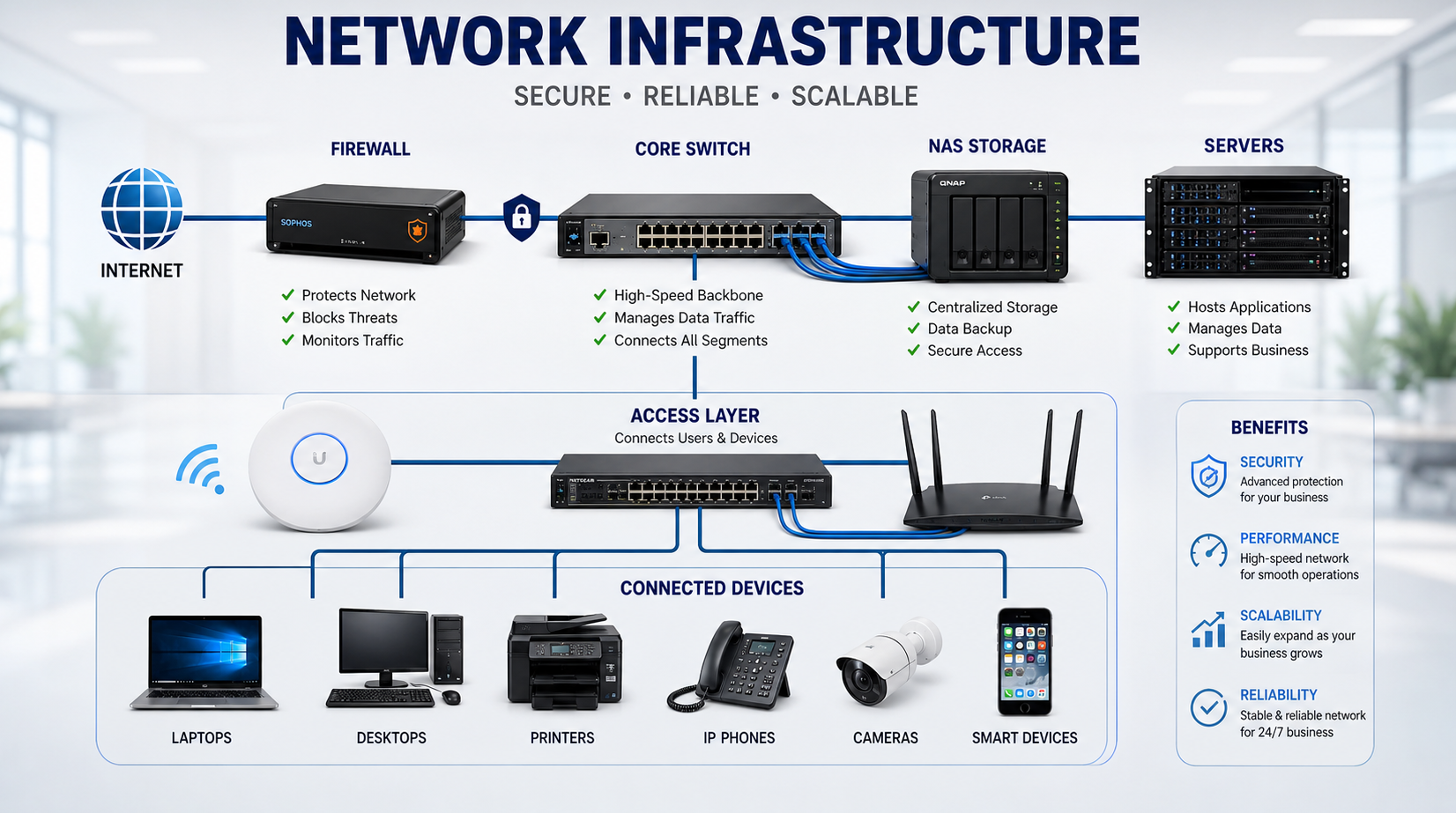
Features to Look for in Enterprise Networking Solutions
- Centralized cloud management
- Load balancing and bandwidth control
- Advanced security (firewall, VLAN)
- Scalability for future growth
- Remote monitoring and alerts
Best Networking Brands We Recommend
- Ruijie Reyee
- Cisco
- Ubiquiti UniFi
- TP-Link Omada
- Fortinet (for security)
Business WiFi Setup Cost Factors
| Factor | Impact on Cost |
|---|---|
| Office size | More area = more access points |
| User count | Higher users need better hardware |
| Cabling | Structured wiring cost |
| Security setup | Firewall and configuration |
| Installation | Professional deployment |
Looking for Business WiFi Setup in Ahmedabad?
Get Reliable Enterprise WiFi for Your Office
We design and implement business-grade WiFi solutions with proper planning, installation, and long-term support across Ahmedabad.
Contact Kapadia InfotechFinal Thoughts
Business WiFi is not an expense—it’s an investment in productivity and reliability.
The right setup ensures smooth operations, better performance, and zero frustration for your team.
If your current WiFi is slowing you down, it’s time to upgrade to a proper enterprise solution.